Use the “File > Open TKS…” wizard as per usual, and ensure “Select 2d Seismic” is checked on the first page. Proceed as per usual, but on the screen titled “Seismic Processing Velocities“, drag the lines (or whole folder) with the interval velocity data type (in the screenshot below, called “Velocity“) into the seismic velocity folder on the right-hand tree. Then ensure “Generate Processing Velocities” is turned on & set the “Velocity Type” to “Interval“.
Specify the vertical decimation – 100ms is usually ok, but this may vary depending upon the geological complexity.

Proceed through the Wizard until everything is loaded into the model. On the “Surface” display, turn on the “Line” and “Velocity” overlay to see the locations of velocities loaded (pink blobs).
Set the “Edit Mode” drop down to “Velocity” then click on the pink blobs to check the values at that location. Pay attention to units of the velocity, as sometimes velocities may be in e.g. feet/s in a metric project.
Other Velocities that can be read in through this entry point in the TKS link:
RMS (Seismic Velocities) – will need to be processed through the Dix module within VelPAK to calculate the Interval Velocity and Depth.
Average – will calculate the Time-Depth pairs on reading into VelPAK and will not require Dix to be run on them.
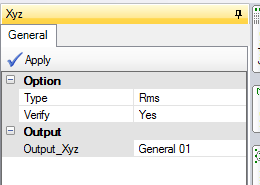
None will read any volume values into VelPAK and place this value into the RMS storage slot within VelPAK. They will not be RMS velocities! This option simply ‘borrows’ the slot for storage within VelPAK. These values can then be interpolated to produce a XYZ file in VelPAK from the XYZ routine within the Volume module by selecting the RMS as the Type of Z to be extracted from the slice: