
LogToVolume included with VelPAK and Kingdom Seismic Inversion, enables advanced Next Generation Depth Conversion and serves as a versatile property spreader.
LogToVolume integrates with your existing TKS project to generate high-resolution volume models based on a combination of a background velocity model, well velocity logs, and geological interpretations. It propagates well log velocities within a volume that aligns with geological and interval velocity constraints, ensuring the volume ties back to the well logs. The result is a sophisticated, high-definition volume that can be used for depth conversion, attribute analysis, reservoir characterization, and as input for seismic inversion workflows. The software also includes a simple, intuitive wizard that guides you through the process, making it easy to generate the volumes and grids you need quickly.

Geologically Consistent Models
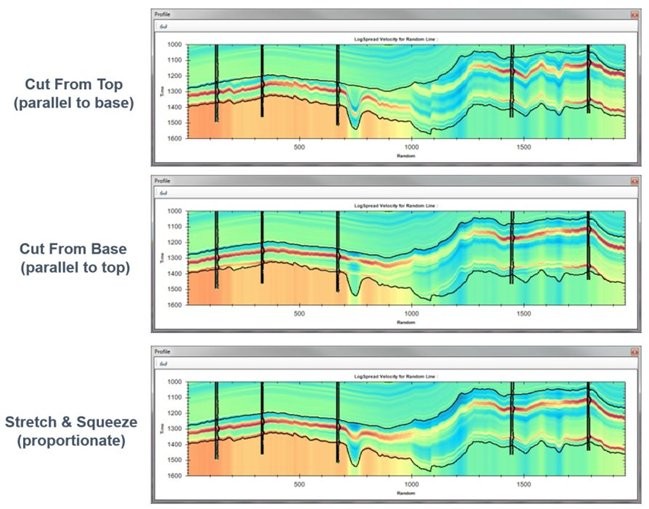
The image below demonstrates how the geological behavior of a middle layer can be modified within LogToVolume. The geological characteristics of each layer are defined by assigning one of three spread types:
- Cut from Top: The layers remain parallel to the base but are “cut” at the top. Here, the red velocity profile is adjusted to be parallel with the base of the layer.
- Cut from Base: The layers remain parallel to the top but are “cut” at the bottom. In this case, the red velocity remains parallel to the top of the layer.
- Stretch and Squeeze: The well is either stretched or squeezed to fill the layer horizon, regardless of the layer’s thickness. This is shown when the red velocity stretches where the layer becomes thicker.
Depending on your chosen spread type, the volumes generated can vary greatly. It’s essential that you, as the user, apply the correct geological knowledge to select the appropriate cut type.
Depth Conversion in LogToVolume
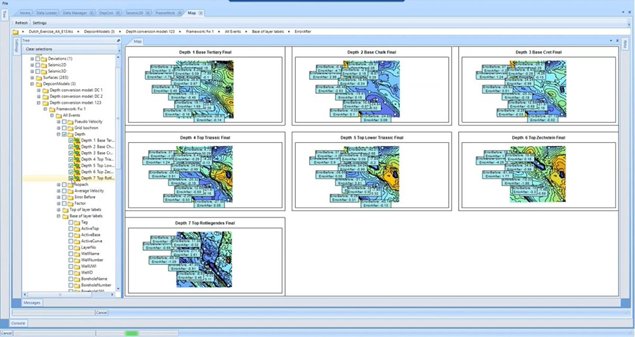
The depth conversion capabilities in LogToVolume generate corrected velocity volumes, depth grids, and other related grids. You can also depth convert existing volumes, or convert between time and depth, interval, and average velocity.
The software allows you to view and manipulate any data you’ve created, displaying layer-specific information on maps. The visibility of the layers and associated data can be easily controlled via the model tree, where you simply select the layers you wish to display.
Once you’re finished, click the ‘Write Grids’ button to sync the data with Kingdom. The software integrates seamlessly with Kingdom, ensuring your data is immediately available in the Kingdom tree.
Volume Creation in LogToVolume
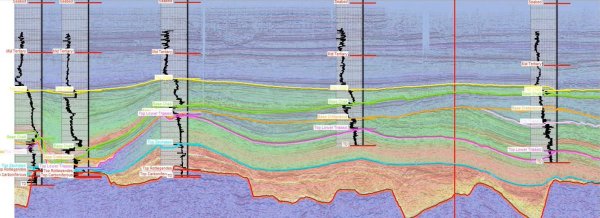
The final step is volume creation. This step converts a time-domain volume into the depth domain using a velocity volume. For instance, a time-domain amplitude volume can be converted to a depth-domain amplitude volume. These volumes, once processed, are reloaded into Kingdom and made available for further analysis.
When the volume is processed, it can be accessed within Kingdom as a seismic volume in the depth domain. In the image below, you can see how the velocity volume is overlaid on the seismic data, providing a robust depth conversion that ties to well locations. The velocities within the layers reflect the geological complexity of the data, ensuring the results are highly reliable.
If you’d like to learn more about the LogToVolume module, VelPAK, or Kingdom Seismic Inversion, click here. You can also reach out to us for a free evaluation by emailing sales@equipoisesoftware.com.